
Dog Collar AirTag Holder
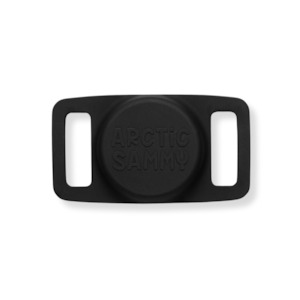
Worried that your dog might escape and get lost? Just install your Apple AirTag in the Arctic Sammy Air Tag Dog Collar Holder for 24/7 dog tracking, straight from your iPhone.
This silicone AirTag collar holder securely fastens to your pet's collar and is made of 100% soft silicone. It has a precisely designed slot to securely house an AirTag with its curved interior. Simply place your AirTag inside and feed your dog's collar or harness straps through.
- Lightweight and durable
- Keeps your AirTag safely attached
- Attaches to your dogs collar or harness (does not work with Martingale Collars or collars without buckles)
- The Airtag from Apple is not included in this purchase Sizing
- Fits bands and straps up to 25mm width (does not work with Martingale Collars or collars without buckles)
- 6.5x3.5cm How does an AirTag work?
AirTags are little tags that can be attached to your dog's collar or harness. If your dog goes missing and is within Bluetooth range of your device, you can use the "Find My" app to locate the AirTag. This feature guides you with on-screen arrows and distance indicators to help you find your dog.
If your dog goes missing and is out of Bluetooth range, you can enable Lost Mode for the AirTag through the Find My app. This puts the AirTag into a mode where it can be located by any Apple device that comes into range, and you’ll receive notifications with its location updates. You’ll be emailed the address where your AirTag was discovered, and you can even change your settings so that the phone that made touch with your AirTag receives a message from you with instructions. How to set up your AirTag
Purchase an Apple AirTag and pair it with your phone. Now you can assign it a name - simply choose your dogs name since this is what you are tracking. Then, confirm your email and phone number to register the AirTag to your Apple ID.
Go to your Apple "Find My" app and tap tyour dog/s AirTag. Swipe up on the menu to reveal additional options and select “enable" under "Lost Mode". Hit “continue," then enter the phone number or email you want people to contact and hit “next." On the final page, select whether or not you want to be notified when the item is found, add what message you want to show up on the finder’s phone and hit “activate" to save everything.