
Bambu Lab CyberBrick Time-lapse Kit
Compatible Printers: Bambu Lab – All
Compatible AMS: All
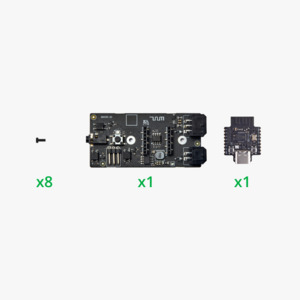
What is in the box?
Multi-Function Core Board x1
Time-lapse Trigger Shield x1
BT2c6 SHCD Slef Tapping Screw x8
Please note that the product does not include the 3D printed parts as shown in the main image.
For P2S Users who don't already have an AMS connected, you will need to purchase the P2S AMS Buffer to use the product Frequently Asked Questions
1. Can't pair with "BBL SHUTTER" device?
Please delete the paired "BBL SHUTTER" device information from your phone and try pairing again.
2. Can't the camera find the "BBL SHUTTER" device?
If another device occupies the Bluetooth port, it may cause the Bluetooth connection to not be retrieved. Please disconnect the time-lapse photography kit from the printer for 2 seconds and then reconnect.
3. Can't establish a Bluetooth connection with the paired time-lapse photography kit after restarting the camera?
Press and hold the multifunction button for 2 seconds to try to reconnect the previously paired device. If you still can't connect, delete the camera pairing information and pair it again.
4. Both the camera and the time-lapse photography kit have been powered off. The kit cannot be automatically connected after the camera is turned on?
Press and hold the multifunction button for 2 seconds to reconnect the previously paired device.
5. Frame dropping phenomenon occurs in the synthesized time-lapse photography video?
iOS device may miss files during photo transfer, please reconnect your phone to your computer to ensure that all photos are copied.
6. How many shooting devices can be controlled at the same time?
Supports up to 4 devices: connect 1 smartphone and 1 camera via Bluetooth, 1 camera via shutter cable, and 1 camera via mechanical servo.
7. Why is it recommended to use the official cable to connect the kit with the printer?
This can avoid the time-lapse photography function not working due to invalid connection between devices to the greatest extent. Important Notices
- For security and stability, the CyberBrick Multi-Function Core Board only supports firmware updates through official tools. Flashing with third-party tools is not supported and may cause irreversible damage, which is not covered by warranty. Please use only official tools for any firmware operations. Thank you for your understanding!
- If you have purchased the time-lapse photography shield and are using it together with the Cyberbrick core board, please refer to the wiki to flash the time-lapse photography firmware.
- The company is not responsible for any device damage, malfunction, fire, or other losses resulting from failure to comply with the above requirements. Please strictly follow the safety instructions for this product.