
Gigabyte B650M GAMING WIFI AM5 mATX Motherboard
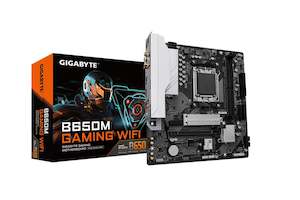
- AMD Socket AM5: Supports AMD Ryzen™ 7000/ Ryzen™ 8000/ Ryzen™ 9000 Series Processors
- Unparalleled Performance: 5 2 2 Phases Digital VRM Solution
- Dual Channel DDR5: 2 SMD DIMMs with AMD EXPO™ & Intel® XMP Memory Module Support
- SuperSpeed Storage: PCIe 4.0 x4 M.2 Connector
- EZ-Latch: PCIe x16 Slot with Quick Release Design
- Fast Networks: 2.5GbE LAN & 802.11ac Wi-Fi
- Extended Connectivity: HDMI , D-sub
- Smart Fan 6: Features Multiple Temperature Sensors, Hybrid Fan Headers with FAN STOP
- Q-Flash Plus: Update BIOS Without Installing the CPU, Memory and Graphics Card OVERVIEW Durable Performance
GIGABYTE Ultra Durable™ motherboards built with optimal components inside out provide the prime performance and timeless platform. Digital VRM Design
5 2 2 Phases Digital VRM Solution with Low RDS(on) MOSFETs
GIGABYTE UD series motherboards use a 5 2 2 phases digital PWM Low RDS(on) MOSFETs design to support AMD's new generation CPUs by offering incredible precision in delivering power to the motherboard's most power-hungry and energy-sensitive components as well as delivering enhanced system performance and ultimate hardware scalability.
Photo for reference only. EXPO & XMP Support
DDR5 EXPO & XMP Overclocking Up to 6400 and Beyond
GIGABYTE is offering a tested and proven platform that the memory overclocking capability is able up to 6400 and beyond. All users need to do for achieving this extreme memory performance boost is to ensure that their DDR5 memory modules are AMD EXPO™/ Intel® XMP capable, the EXPO/XMP function is activated and enabled on their GIGABYTE motherboard.
EXPO/XMP profiles support may vary depending on memory modules.
Please refer the completed validated memory support list.
Product features may vary by model.
Secure Mode
MB provides fixed 5V to Native DDR5 memory and built-in PMIC outputs locked 1.1v to memory IC.
- GIGABYTE exclusive circuit design unlocks Native DDR5 voltage control
- Transforms Native DDR5 memory module to Overclocked DDR5 memory
- Increases DDR5 memory overclocking performance and capability
- Supports all PMIC vendors for maximum compatibility
Memory overclocking capabiblity will vary based on users' hardware configuration
Programmable Mode
GIGABYTE's exclusive design unlocks Native DDR5 PMIC secure mode into programmable mode and control Native DDR5 voltage with wide range.
Future Connectivity
The ultimate connectivity with blazing data-transfer speeds through the next generation network and storage. 802.11ac Wi-Fi
Faster and Better Coverage with Dual Band 802.11ac Wi-Fi BT 4.2 Module The onboard 802.11ac Wi-Fi module supports Dual Band and up to 433 Mbps, 3x faster Wi-Fi speed than 802.11n and also support BLUETOOTH 4.2 2.5GbE LAN
Supercharge your gaming with 2.5GbE LAN Achieve lightning-fast speeds, minimal lag, and unbeatable performance to elevate your gaming setup and dominate the competition. PCIe 4.0 Hardware Design
GIGABYTE B650 Motherboards are ready to work with the PCIe 4.0 devices which are expected to experience twice bandwidth than the current PCIe 3.0 devices. To reach the high speed and maintain good signal integrity, GIGABYTE R&D uses the low impedance PCB to provide the maximum performance.
Photo for reference only. Hi-Fi Audio
High-End Audio Capacitors
GIGABYTE motherboards use high-end audio capacitors. These high quality capacitors help deliver high resolution and high fidelity audio to provide the most realistic sound effects for gamers.
Audio Noise Guard
GIGABYTE motherboards feature an audio noise guard that essentially separates the board's sensitive analog audio components from potential noise pollution at the PCB level. Easy Friendly
Innovative and intuitive hardware, software, and BIOS interface design to create your personal style. EZ-Latch
Unlock the latch of the PCIe slot easily when remove the graphics card in the PCIe slot. Q-Flash Plus
Update the BIOS easily without installing the CPU, memory and graphics card. With GIGABYTE Q-Flash Plus, you don't need to install the CPU, memory and graphics card nor enter the BIOS menu to flash the BIOS. Just download and save a new BIOS file (rename to gigabyte.bin) on the USB flash drive, then press the dedicated Q-Flash Plus button and you're good to go!
STEP 1: Plug 24pin & 8pin power supply cable on motherboard
STEP 2: Download motherboard BIOS file and rename to ""gigabyte.bin"", save to USB flashdrive, and plug USB flashdrive into Q-Flash USB port
STEP 3