
MOZA R9 V3 Direct Drive Wheel Base
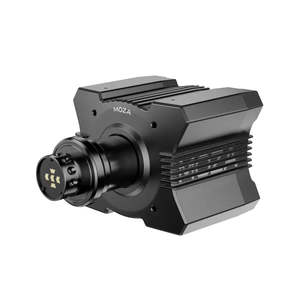
- R9 V3 DD Wheelbase × 1
- Power Supply
- Toolkit
- USB Cable
- User Manual
- Warranty Card FAQs Which steering wheels are compatible with the MOZA R9 V3?
The R9 V3 is compatible with all MOZA Racing steering wheels, including:
- MOZA GS V2P / GS GT
- MOZA FSR / FSR2
- MOZA KS
- MOZA CS V2
- MOZA RS V2
- MOZA ESX
- And future MOZA universal wheels Compatibility of MOZA R9 V3 with Fanatec, Thrustmaster, and other brands of hardware?
We are always asked if it is possible to use Fanatec and Thrustmaster, or other brands of wheels, pedals, shifters, and other accessories with MOZA Racing. Often, devices from different vendors are not compatible with each other. So you can’t directly connect products from different companies to each other, or at least not support that way.
There may be adapters on the market that make this combination possible, but due to the different technologies used in the hardware and different signal tolerances, these solutions are unreliable even with similar specs. MOZA Racing cannot make any representations regarding third-party adapters or similar solutions. Of course, we are striving to achieve the highest possible incompatibility between all devices, although this is not easy to achieve. For any compatibility issues, we can only direct you to the information provided on our product pages or FAQs. Is the R9 V3 suitable for desk setups?
Yes. The compact design of the R9 V3 makes it ideal for desk users. It supports desk clamps and mount adapters, allowing for flexible installation on various setups. What is the maximum torque of the R9 V3, and what type of games is it best for?
The R9 V3 delivers a maximum torque of 9 Nm, making it well-suited for a wide range of racing sims—including F1, GT, rally, and street racing games. Does the MOZA R9 V3 work with other MOZA ecosystem products?
Yes. The R9 V3 is fully compatible with the MOZA Racing ecosystem, including pedals, shifters, dash displays, and more. All devices can be configured through the MOZA Pit House software. // Accordion toggle (matches R3 Xbox behaviour) document.querySelectorAll('.acc-btn').forEach(function(btn) btn.addEventListener('click', function() var panel = btn.nextElementSibling; var plus = btn.querySelector('.acc-plus'); var isOpen = panel.style.display === 'block'; panel.style.display = isOpen ? 'none' : 'block'; plus.textContent = isOpen ? ' ' : '–'; ); )