
MOZA ESX Steering Wheel For XBOX
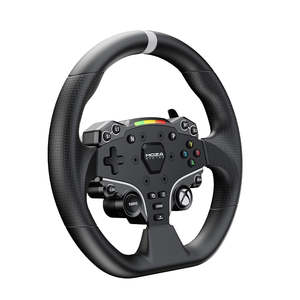
The MOZA ESX Steering Wheel combines official Xbox licensing with MOZA Racing’s direct drive technology to deliver an unparalleled racing experience on both PC and Xbox. Built for durability and comfort, it features a solid aluminum alloy rim and non-slip, sweat-proof ISF PU grips, ensuring peak performance during intense races. Its compatibility with PC and Xbox platforms offers seamless versatility for gamers. The wheel boasts 22 customizable buttons, including two joysticks, allowing for comprehensive control and on-the-fly adjustments. Fully adjustable RPM LED lights bring a dynamic visual element to your setup, while the industry-leading MOZA quick-release system ensures effortless wheel swapping. Whether you’re racing on PC or Xbox, the ESX Steering Wheel is the perfect choice for dedicated enthusiasts.
SPECS Product Specifications of ESX Wheel
- Platforms: PC & Xbox
- Grips: ISF PU
- Face Plate Material: Aluminum Alloy
- Shifter Paddle Material: Aluminum Alloy
- Size: 280mm
- Buttons: 22
- RPM LED Light: 10 High Brightness LED RGB Beads
- Intelligent Telemetry: Supported
- Fully Adjustable RPM LEDs through MOZA Pit House: Supported
- Release Method: MOZA Quick Release User Manual
MOZA ESX Steering Wheel Support >What’s in the Box
- MOZA ESX Wheel × 1
- MOZA Sticker FAQs Is the ESX wheel plug-and-play on Xbox?
Yes, the ESX is officially licensed for Xbox and works out of the box with supported titles. For advanced tuning and customization, using MOZA Pit House on PC is recommended — even for Xbox players who want to fine-tune settings like force feedback, LED behavior, and button assignments. Is the ESX compatible with all MOZA bases?
Yes, the ESX is fully compatible with all MOZA wheelbases, including the R3, R5, R9, R16, and R21. On Xbox, use it with the R3 bundle or future officially supported bases for full console compatibility. Can I use the ESX with other Xbox-compatible MOZA accessories like H-pattern shifters or handbrakes?
Peripherals can obtain Xbox certification support by directly connecting to the base. If the game supports custom key bindings, the peripherals can be adapted normally in the game (the adaptation needs to be determined according to the specific game). How do I switch Xbox/PC mode?
Press and hold the S1 and S2 buttons on the ESX steering wheel simultaneously for 5 seconds. The base will automatically restart and switch modes.
- In Xbox mode: The RPM lights will move from the left and right to the center.
- In PC mode: The RPM lights will show red, yellow, and green breathing lights. Can the Xbox controller be connected at the same time?
The Xbox controller and the racing steering wheel are two different control devices and there will be no conflict. However, in the Forza series, switching back and forth between devices may cause constant vibration on the controller.
Tentative solutions:
- Controller (wired): Disconnect the USB power cable.
- Controller (wireless): Long press the Xbox button and choose to turn it off.accordion-btn background:#f5f5f5; cursor:pointer; padding:16px; width:100%; text-align:left; border:none; outline:none; font-size:16px; font-weight:bold; display:flex; justify-content:space-between; align-items:center; margin-bottom:4px; font-family: inherit;.accordion-btn.plus font-size:20px;.accordion-panel display:none; background:#fff; padding:16px; margin-bottom:8px; font-family: inherit; document.querySelectorAll(".accordion-btn").forEach(btn=>btn.addEventListener("click", ()=>const panel=btn.nextElementSibling; const plus=btn.querySelector(".plus"); if(panel.style.display==="block") panel.style.display="none"; plus.textContent=" "; else panel.style.display="block"; plus.textContent="–"; ); )