
ELM327 V1.5 WiFi OBD2 Scanner Code Reader
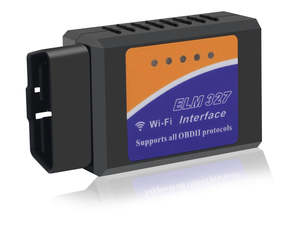
ELM327 V1.5 WiFi OBD2 OBDII Car Diagnostic Scanner Code Reader Tool.
• Compact & Portable for Glove Box.
• View Live Engine Data (RPM, Temp).
• WiFi Connects to Smartphone/Tablet.
• Works with Most Cars (1996 Onwards).
• Read & Clear Check Engine Light (CEL) Codes.
• Supports OBD2 Protocols (Holden, Ford, Toyota).
Q: Does firmware V1.5 better than V2.1?
A: Yes, firmware V1.5 is more stable than V2.1, also from customer feedback, V1.5 supports more protocols and car brands.
You may have following parameters read out from your vehicle:
Air Intake Temp
Barometric Pressure
Calculated Engine Load
Engine Coolant Temp
EVAP System Vapor Pressure
Fuel Consumption
Fuel Level
Fuel Pressure
Fuel Trim
Intake Manifold Pressure
Mass Air Flow
RPM
Throttle Position
Timing Advance
Vehicle Speed
Note: Your vehicle may not support all above parameters. How many parameters you can get is depended on the vehicle manufacturer’s implementation.
Multi-Protocol Support:
SAE J1850 PWM (41.6 kbaud)
SAE J1850 VPW (10.4 kbaud)
ISO 9141-2 (5 baud init,10.4 kbaud)
ISO 14230-4 KWP (5 baud init,10.4 kbaud)
ISO 14230-4 KWP (fast init,10.4 kbaud)
ISO 15765-4 CAN (11 bit ID,500 kbaud)
ISO 15765-4 CAN (29 bit ID,500 kbaud)
ISO 15765-4 CAN (11 bit ID,250 kbaud)
ISO 15765-4 CAN (29 bit ID,250 kbaud)
SAE J1939
Vehicle Coverage:
Works with all models that support the OBD2 standard (Acura, Alfa Romeo, Ariel Atom, Aston Martin, Audi, Bentley, BMW, Buick, Cadillac, Chevrolet, Chrysler, Citroen, Daewoo, Daihatsu, Daimler, Dodge, Ferrari, Fiat, Ford, Geo, GMC Holden, Honda, Hummer, Hyundai, Infiniti, Isuzu, Jaguar, Jeep, Kia, Lamborghini, Lancia, Land Rover, Lexus, Lincoln, Lotus, Maserati, Mazda, McLaren, Mercedes, Mercury, MG, Mini, Mitsubishi, Nissan, Oldsmobile, Opel, Pagani, Panoz, Peugeot, Plymouth, Pontiac, Porsche, Regal, Renault, Rolls Royce, Roush, Rover, Saab, Saleen, Saturn, Scion, Seat, Shelby, Skoda, Smart, Subaru, Suzuki, Tesla, Toyota, Triumph, TVR, Vauxhall, Volkswagen, Volvo, Yugo..).
Specifications:
Colour: Black.
Sold as: Each.
Condition: New.
Packaging: Bulk.
Connectivity: Wifi.
Product Category: ELM327.
Product Code: OBD2-WF-ELM327-NZ.
Product Type: NZ OBD2 Scanner - WiFi ELM327 V1.5.
Product Marking: ELM 327 Wi-Fi Interface Supports all OBDII protocols.
Connector: Male 16-pin (2x8) D-shaped Type-A 12V OBD-II diagnostic connector.
Package includes: 1x .
Note: Does not include an OBD2 App or software. Download a free app recommended for your phone system before using our OBD2 adapter. Paid apps offer more information than free ones, so choose the one that best meets your needs. Not all vehicles support the same OBD2 parameters. The number of parameters that your vehicle supports depends on the vehicle manufacturer's implementation. The image is for illustrative purposes only. Due to camera, lighting, monitor and manufacturing variations, colours may vary.
People also search for: OBD2 scanner app NZ, ELM327 wifi connection problems, best OBD2 scanner for car, ELM327 v1.5 vs v2.1 NZ, OBD2 codes lookup, can OBD2 scanner reset check engine light NZ, is ELM327 legal in NZ.
Warranty & : 14-day 'change of mind' return in unused condition for a refund less shipping fees. 1-year return to base refund or replace guarantee.
We welcome & answer all questions.
Installation Hints, Tips and Troubleshooting:
Installation:
Locate your OBD2 Port: This is usually a 16-pin port found under the dashboard near the steering wheel. Consult your car's manual if you have trouble finding it.
Plug in the Scanner: Gently insert the ELM327 scanner into your car's OBD2 port. Ensure a snug fit for a reliable connection.
Connecting to WiFi:
Download a Compatible App: There are many OBD2 diagnostic apps available for smartphones and tablets. Popular options in New Zealand include Torque Lite, Kiwi OBD, and DashCommand. Choose one compatible with ELM327 v1.5 WiFi scanners.
Connect to Scanner WiFi: Refer to your scanner's manual or a sticker on the device for its default WiFi name and password. On your phone/tablet, navigate to WiFi settings and connect to the scanner's WiFi network using the provided credentials.
Tips for Smooth