
Keychron K10 HE Wireless Black Gateron Double-Rail Magnetic Nebula Magnetic Switch Keyboard
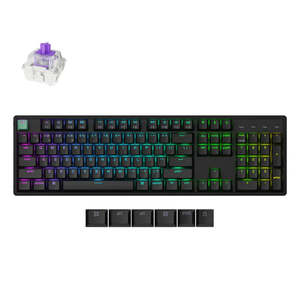
The Fully Assembled version includes:
- The keyboard PCB, the case, and the aluminum plate.
- Keycaps (included Mac & Windows keycaps).
- Adjustable-actuation-point Gateron double-rail magnetic switches.
The K10 HE is compatible exclusively with the Gateron Double-Rail Magnetic Switch. It does not support other magnetic switches, such as the Gateron Magnetic Jade or Gateron KS-20 Magnetic switches.
Transform your gaming and typing experience with the Keychron K10 HE. Combining classic mechanical feel with cutting-edge magnetic technology, it offers exceptional performance in a sleek design€"enhanced by elegant natural rosewood accents.
A fully customizable 100% layout wireless keyboard with magnetic switches €" a breakthrough in switch technology, which€"instead of physical contacts€"uses magnetic sensors to measure actuation depth, putting you in total control over the response of each and every switch. Standard Version
The Standard Version features Cherry profile double-shot shine-through PBT keycaps and aluminum frames. Gateron Double-Rail Magnetic Switches
Keychron K10 HE comes with pre-lubed Gateron double-rail magnetic switches for an ultra-stable and ultra-responsive typing experience with an industry leading, lightning-fast response time, and precise control over the way your keyboard feels and responds. Jump into action with unmatched smoothness and stability.
As opposed to traditional mechanical switches, magnetic switches use pressure-sensitive hall effect sensors to detect keypresses€"which means you get to set the depth at which you want each keypress to engage, with 0.1 millimeter precision. Add Gateron Double-Rail Magnetic Switch to cart
Adjustable Actuation Point
Customize each key with precision, adjusting actuation points from 0.2 to 3.8 mm with 0.1 mm sensitivity. Set shallow keypresses for instant actions and deeper ones for deliberate engagement, minimizing accidental touches and giving you an edge in both gaming and typing.
Last Key Priority (LKP) & Snap Click
LKP allows seamless directional changes by prioritizing the last key pressed, ensuring smoother gameplay in titles like Valorant. With Snap Click, deeper keypresses take precedence when two keys are hit at once, automatically resetting shallower presses.
Together, these features make counter-strafing effortless, giving you the accuracy and speed needed for high-level FPS play.
They are disabled by default, but you can easily enable them in our Launcher web app when needed.
Dynamic Rapid Trigger
Activate or deactivate keys based on how far they travel, not predefined points. This means immediate key reactions€"press to activate, release to reset€"allowing for faster, more precise keystrokes. In rapid gameplay, this translates to executing complex actions in real-time without delay, giving you a serious advantage during fast-paced sequences.
One Key. Multiple Actions
Thanks to Dynamic Keystrokes (DKS), you can now assign up to 4 distinct actions per key based on press depth. A light press moves your character, a deeper press makes them run, and releasing the key enables additional commands. This layered control lets you execute multiple moves with ease, streamlining gameplay while enhancing control and speed, making your reactions quicker and more precise.
Analog Mode
Experience the power of Analog Mode on your K10Â HE, bringing game controller-like precision to your keyboard. This mode enables variable inputs instead of the usual on/off signals, letting you achieve more fluid and dynamic control.
With each keypress, the K10 HE detects how far you press, translating it into different speeds and intensities. Enjoy nuanced control and heightened responsiveness in racing games, sports simulations, and more. Program with QMK & Launcher.
The open-source QMK firmware means endless possibilities for key remapping, macros, shortcuts, and more. With the Keychron Launcher web app, you can effortlessly remap keys, adjust actuation points, set the magnetic switches, create personalized macro commands, shortcuts, and key combinations for each key.Â
to use Keychron Launcher
Please use the latest version of Chrome / Opera / Edge browser to open the Launcher and connect the keyboard to your device via wired mode. Anytime, Anywhere Access
Keychron Launcher is a web page configurator that you can use in the office, school, lab, or government department€"anywhere with internet access. Configure your keyboard online anytime without the need to download or install files. No hassle, no trouble.
Compatible with All Platforms
DOUB