
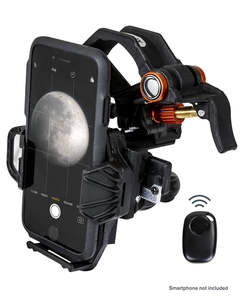
Celestron NexYZ DX 3-Axis Universal Smartphone Adapter with Bluetooth Remote
- Never look directly at the Sun with the naked eye or with an optic (unless you have the proper solar filter). Permanent and irreversible eye damage may result.
- Never use your optic to project an image of the Sun onto any surface. Internal heat build-up can damage the optic and any accessories attached to it.
- Never leave your optic unsupervised. Make sure an adult who is familiar with the correct operating procedures is with your optic at all times, especially when children are present.
NexGO Smartphone Adapter Instructions
- Unfold your NexGO, and make sure the clamp is locked in with the main assembly.
- Connect the NexGO to your eyepiece
- Position the clamp around the eyepiece and tighten the orange clamp knob until secure.
- This can be done with the eyepiece remove from the optical device, if you choose.
- Attach your phone
- NexGO works with most regular phone cases, but you will need to remove “folio-style" cases. To insert your phone, pull the spring-loaded slider out. Place your phone on the platform, making sure the bottom is touching the rubber base. Then release the slider. Your phone should now be secure and ready for imaging. If it feels a bit loose, you may need to make tension adjustments to the rack and pinion system to keep the phone firmly in place. To do this, reference Tension Adjustment Guide under Support & Downloads.
- Align and shoot
- Open your camera app. Center your phone camera over the eyepiece by adjusting the X- and Y-axis knobs. Finally, adjust the focus using the focuser on your optics and snap the image.